
Exa Websets
Exa Websets is a workspace for building structured lists from the public web. Describe the people, companies, papers, or other entities you want in natural language; set criteria that each result must satisfy; then add fields for the system to research for each accepted item. The product page emphasizes lead discovery, while the Websets quickstart also describes broader list building and data enrichment. It is useful for researchers, sales operations teams, and developers who need a repeatable collection rather than a handful of search links.
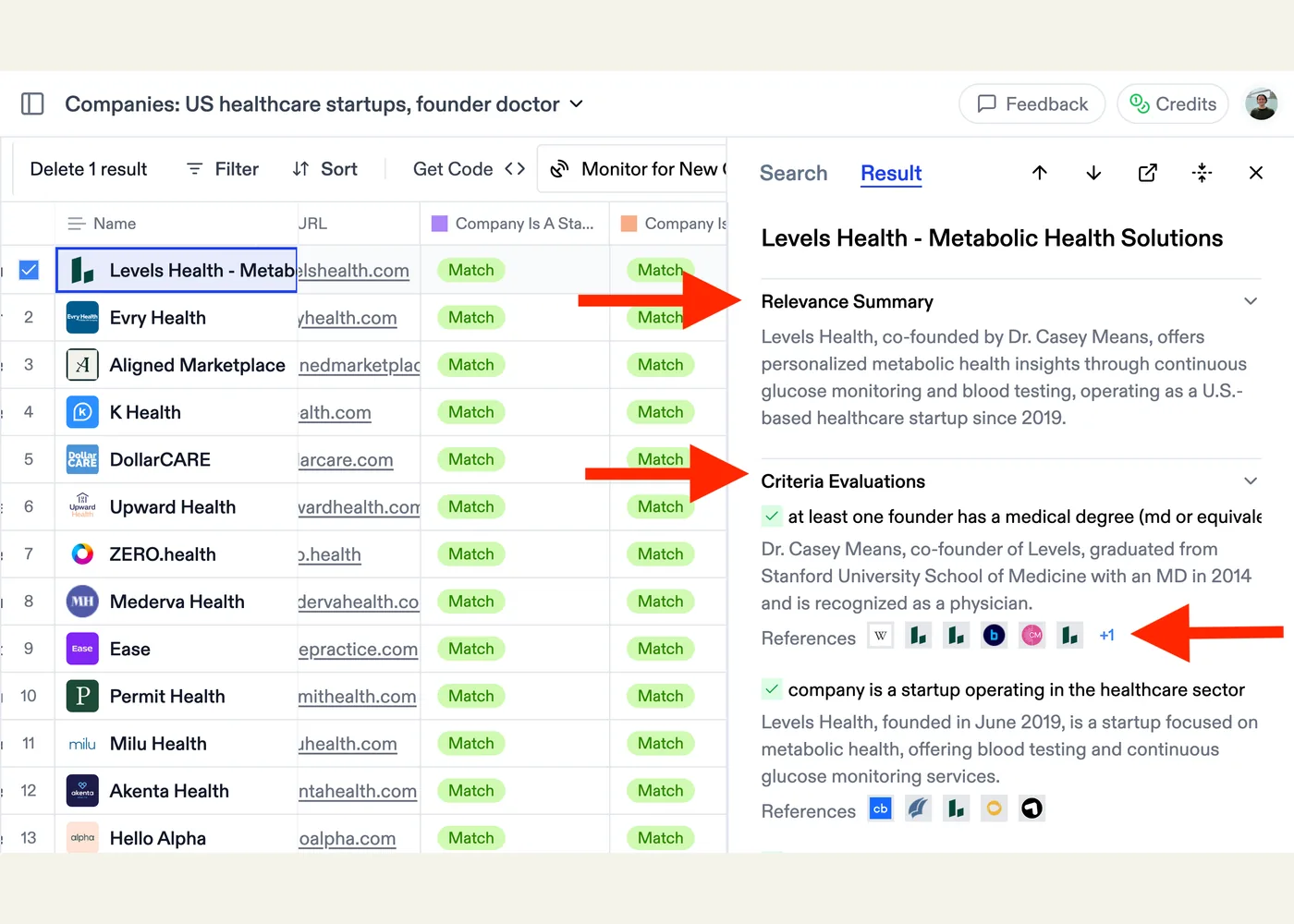
The workflow separates qualification from enrichment. Websets checks candidates against the criteria before adding them to the list, then fills requested columns such as a company detail or contact field. Results arrive asynchronously in the dashboard or through the API and webhooks. The dashboard lets you inspect a result's summary, matched criteria, and supporting sources, remove unwanted rows, and export the finished list as CSV. Monitors can run recurring searches for new matches. These capabilities are documented in Exa's quickstart and dashboard guide.
To start, open Websets, describe a specific list in plain English, review the proposed criteria and entity category, choose a result target, and launch the search. Inspect a sample of accepted rows and their cited sources before adding custom columns or exporting. If the first pass misses relevant records, refine the criteria or ask for more results. Developers maintaining an integration can use the API quickstart, which shows SDK and HTTP examples.
A target count is not a promise: Exa says the final list may be shorter when too few candidates pass all criteria. Narrow or hard-to-prove criteria can make a search sparse, and large requests take longer. Treat the generated fields and verification as research aids; review source evidence before using a row for a consequential decision. Websets uses its own credit system, and Exa's current documentation says API access requires a paid Websets plan; check the live billing page for terms rather than assuming a fixed rate. Source: Exa quickstart.
Example use cases
These are suggested applications:
- Partner landscape: Find European climate software vendors serving utilities, then add columns for target customer, integrations, and supporting source URLs.
- Recruiting research: Build a list of open source maintainers working on a specified toolchain, then review their project pages before outreach.
- Publication watch: Collect papers on a narrow topic, enrich each row with method and dataset, and monitor for newly matching work.
Sources
Source image: Exa.
Maintained by Jetskibay. Reviewed 2026-09-29T00:00:00Z.